
Every week the Trade Marks Journal publishes thousands of new applications. A recent journal had 6,216 marks. If one of them is too close to a mark you protect, you have four months from the journal date to file a notice of opposition. Miss it, and the conflicting mark can go on to registration.
No attorney can read every journal against every client mark. That is what a journal watch is for. But a watch is only as good as the matches it finds, and the matches it leaves out. This post explains how the journal watch in TM Manager finds conflicting marks, how it decides which ones are worth opposing first, and how to work through a journal quickly.
Why most watch alerts miss the real conflicts
Most watch tools reduce each mark to one keyword and compare keywords. That is fast, but it throws away exactly the part that matters. Take "Malabar TEMPTATIONS". A one-keyword tool keeps "temptations", a common word, and drops "Malabar", the word that actually conflicts with your client's mark.
Our own earlier checker worked this way, and we measured it honestly. It caught about 70% of the conflicts that the Registry's examiners later cited, and only about 1 in 7 of its alerts was a real conflict. Attorneys were getting a long list to scroll through, and still missing marks.
We rebuilt the matching from scratch in October 2026.
How the new journal watch finds conflicts
It works in three steps.
It picks out the brand words. Each mark is read once to find the words that carry the brand. "SHREE SAVAJ DAIRY" becomes "shree savaj" and "savaj", not "dairy". This is done once per mark and stored, so it is the same every week.
It compares them the way an examiner would. The brand words of every journal mark are compared with the brand words of every mark you watch: how they look, how they sound in Indian English, and how their letters are built. "Lakshmi" and "Laxmi" sound the same. "Techmo" and "Texmo" sound the same. "R@ZOR-PAY PVT LTD (LABEL)" is read as "razor pay".
It scores each pair, using the examiners' own decisions. The score comes from a model trained on more than 45,000 citations from twelve recent journals, each one a case where the Registry's examiner cited an earlier mark against a new application. So "similar" means what an examiner treats as similar, not what a string comparison happens to find.
Every match comes with the reason in plain words, so you can judge it at a glance:
| Match type | What it means |
|---|---|
| Identical | Same mark, disguised spelling or reordered words |
| Contains | One mark contains the other's name |
| Looks alike | Similar spelling, beginning or ending |
| Sounds alike | Pronounced the same or nearly so |
| Overall resemblance | Alike as a whole, on no single point |
Hover over a match and you see exactly why it was flagged, for example:
Sounds alike (71%): amypose ≈ amipox
How much better it is
We test every change against the examiners' own citations. We take a past journal, every mark the examiners cited against its applications, and 10,000 client marks, and count how many of those known conflicts each approach finds with the same number of alerts.
| Test | Earlier checker | New journal watch |
|---|---|---|
| Journal 2279, known conflicts found | 69.2% | 87.1% |
| Journal 2282, known conflicts found | 72.5% | 88.2% |
| Alerts per mark to find as many | 3.3 | 0.4 |
| 10,000 marks against one journal | under 10 seconds |
In plain terms: with the same number of alerts, it finds far more of the real conflicts. Or, to find as many conflicts as before, it needs about 87% fewer alerts.
The matches it marks as high similarity are the ones to read first. In an independent AI review of sampled alerts, about 79% of high-similarity matches were real conflicts, against 25% at medium and 11% at low.
Best to oppose first
A list of matches is not the same as knowing what to do. So for every journal still open for opposition, your dashboard shows a card with the opposition deadline, the days left, how many journal marks closely match yours, and the five cases best to oppose first.
"Close" here means high similarity in the same class. The five are ranked on facts that decide an opposition, in this order:
- Nobody has opposed it yet. If someone else already has, it drops down the list.
- Your right is earlier. Your filing date or claimed first use comes before theirs.
- Your mark is registered.
- They haven't started using their mark. Their application says "Proposed to be used".
- Then the strength of the match.
The five are spread across your brands, so one large family of marks doesn't fill the list. Marks that are already withdrawn or abandoned are left out, since there is nothing to oppose, and so are marks you have already opposed. The card also shows which clients are affected, and below it, the journals closing soon with how many close marks are left to review in each.
Working through a journal
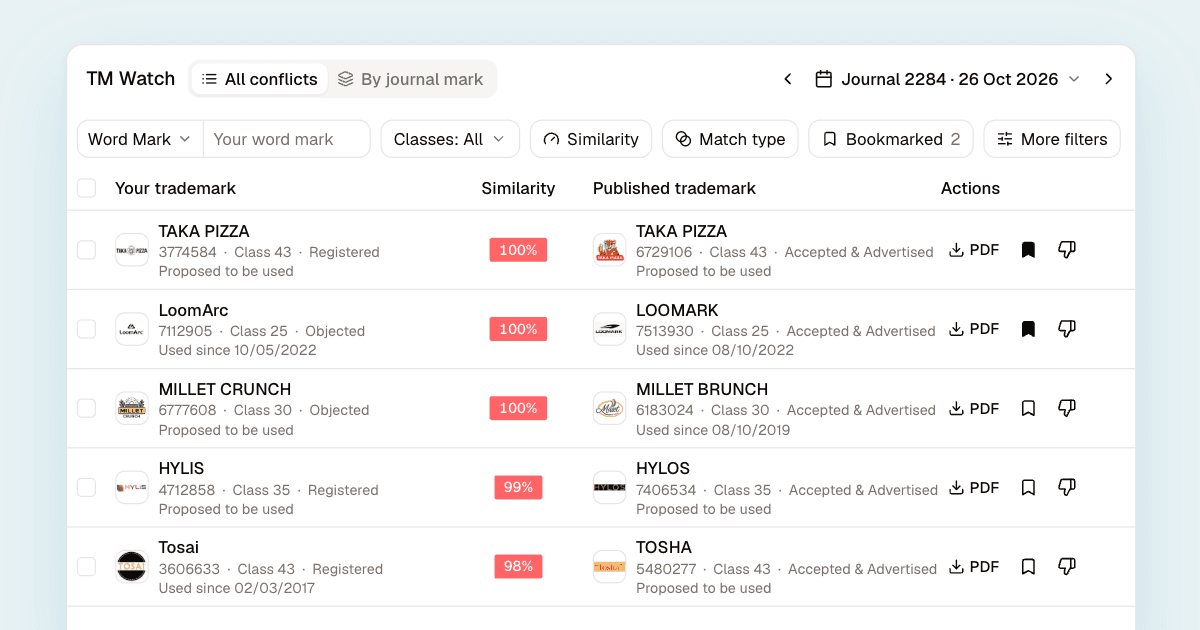
Open a journal in TM Watch and you see every match: your mark on the left, the published mark on the right, with logos, classes, status and use claims for both. These filters do most of the work:
| Filter | Use it to |
|---|---|
| Similarity | Start with high, then medium |
| Match type | See only, say, sounds-alike matches |
| Classes | Same class, same or related, or any class |
| Distinctive words | Hide matches on common words |
| Bookmarked | Keep the cases you mean to act on |
The class filter is yours to set. Class never changes a match's score, because many conflicts cross classes, and you know your clients' businesses better than any rule. "Same or related" covers goods and services that commonly travel together.
"Distinctive words" keeps only matches on a word that 1,000 or fewer owners use on the register. A match on "Gold" or "Shree" is rarely worth an opposition. A match on a rare invented word usually is.
Switch to "By journal mark" to see one published mark with every one of your marks it hits. That is the view to use when you are deciding whether to oppose a single application. Bookmark the ones you will act on, mark the rest "Not a conflict", and download a PDF report of the journal for your client.
Ask whether to oppose
On any match, choose "Ask AI whether to oppose". The AI assistant looks up both marks, compares them, checks how common any shared word is in that class, and recommends whether to oppose, keep watching or let it go. You get the deadline, the reasons and what you would need from the client to file. It does not file anything. The decision stays with you.
What to keep in mind
The watch skips pairs where both marks were filed by the same attorney, since those are usually your own filings for one client. Each journal's matches are fixed once it has been checked, so a mark you add to your portfolio is matched from the next journal on. And no watch is complete. Examiners' citations, our yardstick, miss some real conflicts too. Treat the watch as the list to start from, and use your judgment on what to oppose.
Getting started
The journal watch is part of TM Manager. Add the marks you protect to your portfolio, and every new journal is checked against them automatically. If you are not on TM Manager yet, contact us.