
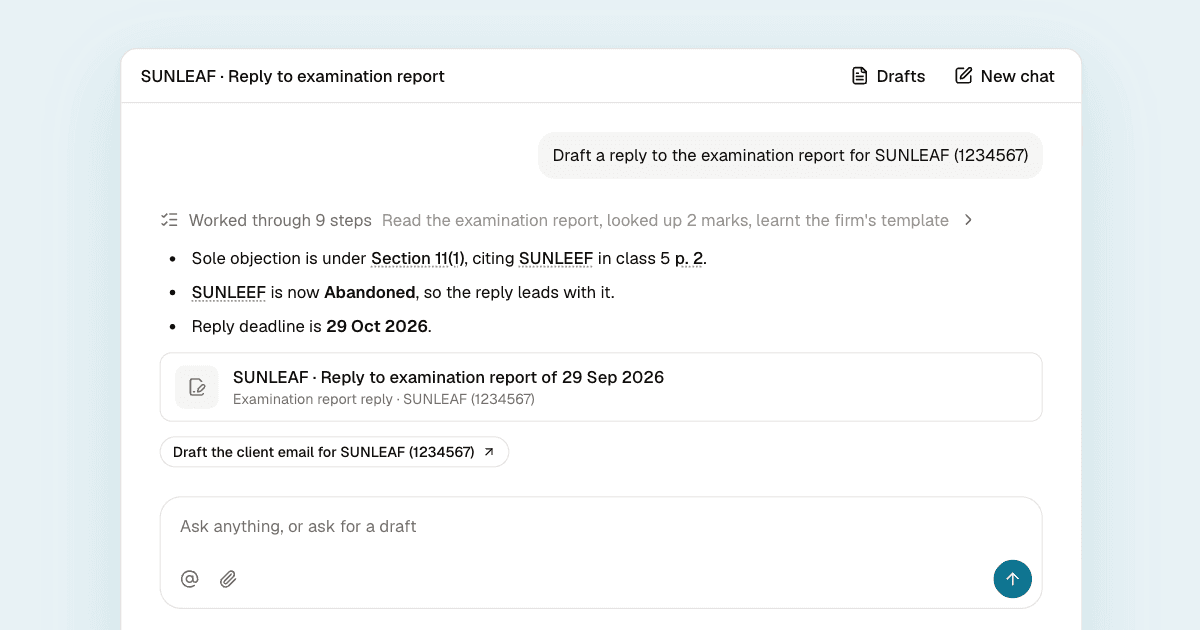
Most of a trademark attorney's week goes into work that has to be done carefully but isn't the hard part: reading examination reports, looking up cited marks, checking deadlines, finding how the firm answered a similar objection last time, and writing it all up in the right format.
We built the AI assistant in TM Manager to take on that work for trademark attorneys in India. You ask it a question or ask for a draft, and it does the lookups, reads the documents and writes the first version. You review it and decide what to file. A reply to an examination report with six cited marks takes it about a minute and a half, and a short reply about 25 seconds.
In this post we'll walk through what it can do in a normal week of practice, how it keeps its answers accurate, how it learns your firm's style, and where it still needs you.
What it can do in your week
The assistant already has your portfolio: your marks, clients, deadlines, tasks and the registry documents on each application. It can also look up any mark on the public register. You never have to paste anything in or explain the background. You ask the way you would ask an associate.
| Ask | What you get |
|---|---|
| "What's due in the next 14 days?" | Deadlines in date order, each with its step |
| "What changed in my portfolio this week?" | Status changes and new Registry documents |
| "What did the examiner object to for SUNLEAF?" | Each objection, its section and cited marks |
| "Draft a short reply" or "a detailed reply" | The reply, in your firm's format |
| "What is due next in this opposition?" | The next step, whose it is, and the date |
| "Draft the counter statement" | A counter statement in your firm's format |
| "Prepare me for Thursday's hearing" | A one-page hearing brief |
| "Should we oppose this journal match?" | Oppose, watch or let it go, with reasons |
| "Which classes for a food delivery app?" | Nice classes from IP India's own list |
| "Is GOLD common in class 16?" | Live marks and owners using the word |
| "Write to the client about the opposition" | A plain-words email to the client |
| "Quote section 11(1)" | The exact text, linked to the source |
Deadlines always name the step they are for, so a hearing, an evidence affidavit and a renewal don't blur together. Objections come with a link to the page of the report they are on. Class suggestions show what each class excludes. A few of these deserve more detail.
Hearing briefs. Ask it to prepare you for a show cause hearing and you get one page you can read before walking in: the date, time, mode and office from the hearing notice; the objections still open and what you already argued on each; what has changed since, such as a cited mark that has since been refused or abandoned, which is often the strongest point to open with; the points to make, strongest first; the questions the hearing officer is likely to ask, with short answers; and what to carry.
Journal watch. It lists your watch matches by journal with their opposition deadlines and tells you which to look at first and why. It can also bookmark or dismiss matches for you, after you approve.
Common to the trade. The count of marks and owners sharing a word is evidence you can put straight into a reply. For example, a reply can say a word "appears in 504 live marks of 390 proprietors in class 16" instead of simply asserting that it is common.
How it drafts a reply
When you ask for a reply to an examination report, the assistant does what a careful associate would:
- It reads the whole report, scanned PDFs included, and finds each objection and every cited mark.
- It looks up all the cited marks on the register at once: the owner, the class, the goods and services, and the status today.
- It compares each one with your client's mark, and counts how many marks and owners use any word they share in that class.
- It reads your firm's past replies on marks that were later accepted or registered, to see which arguments your firm uses and how it words them.
- It looks up the sections and rules it relies on.
- It writes the reply in your firm's format and saves it next to the chat, where you can edit it.
The useful part is that nothing gets skipped because time ran short. Every cited mark is checked, so a mark abandoned since the report doesn't slip past. (If you want the background on why cited marks matter so much, read Trademark Citations in Examination Reports: Why They Matter.)
How it keeps its answers accurate
A wrong date or a misquoted section costs more than the time an assistant saves. Most of our work went into making sure it doesn't get those wrong, and that you can see where it might.
Facts are looked up, never recalled
Every fact about a mark, document, deadline or filing comes from the register or your portfolio at the moment you ask. If it can't find something, it says so instead of guessing an application number, a date, a status or a name.
We test for the cases where general knowledge tempts it to fill a gap. One we caught early: an opposition had a task called "Evidence Affidavit - Rule 46", which is the applicant's evidence. An early version said the opponent's Rule 45 evidence was due on that date. The date was right, but the step and the party were wrong. It now reads a deadline as exactly the step its task names and looks up the rule to say whose step it is, and that case is in the tests we run on every change.
The law is quoted exactly, and only the current law
The assistant quotes only from its own law library:
| Source | What it holds |
|---|---|
| Trade Marks Act, 1999 | Amended up to the Jan Vishwas Act, 2023 |
| Trade Marks Rules, 2017 | Every rule, with its current forum |
| First Schedule | Official fees, physical and e-filing |
| Second Schedule | The forms |
Every section or rule it cites links to the full text. Many copies of the Act online still include the Intellectual Property Appellate Board, which was abolished in 2021, so the library refuses outdated text, and rules that still mention the Board carry a note that the High Court now hears those matters. Our tests compare every quotation it gives with the stored text, word for word. It does not cite case law, and for anything outside the Act and Rules it says the point needs checking.
Every quote from a document links to its page
When it explains a document, it names the document and its date and quotes the line that matters. A typical answer reads like this:
SUNLEAF is Objected (class 5): the examination report of 29 Sep 2026 raises s.11(1) over SUNLEEF [p. 2]. Reply due 29 Oct 2026.
The page link opens the document on that page, so checking takes one click.
Drafts show you what needs checking
Anything the register and your files don't show, such as dates of first use or the client's evidence, appears as [TO CONFIRM: ...], highlighted in the editor and in the exported file.
A few seconds after each draft is saved, a second check reads it against everything the assistant looked up and flags any statement without support: a number, a date, a mark, a status, the goods or a quote from the law. In one test it flagged a draft saying a word "appears in 103 marks across the Register", a figure with nothing behind it. It also never signs an affidavit for the proprietor and never makes up an agent code or enrolment number.
Nothing changes without you
The assistant can mark a task done, add a deadline, and bookmark or dismiss a journal match, but each time it shows you the change first and waits. You approve, edit or reject it. Once you reject something, it doesn't suggest it again. It never files with the Registry and never emails anyone.
It writes the way your firm writes
A correct draft in the wrong format still has to be rewritten, so the assistant learns your style from your own filings. It reads your latest replies and counter statements and follows their wording, header, paragraph order and sign-off, changing only the case details. It never carries over facts or marks from another client's filing.
It chooses short or detailed the way your firm does, based on what you filed for similar cases at the same Registry office with the same kind of objection. It signs as the person whose agent code is on record for the application, and flags it when someone else is on record and authorisation needs confirming. It works out your firm name, signatories and address for service from the register and your filings. You can correct them in the app, and it never overwrites what you enter.
Before it has learned your firm, it follows standard Indian filing format: numbered paragraphs with (a) and (b) within them, headings in bold capitals, word marks in bold with quotes ("SUNLEAF"), the full citation the first time ("Section 11(1) of the Trade Marks Act, 1999"), and goods quoted only as far as the argument needs.
Drafts export to PDF or Word on your letterhead, with logos where firms put them: next to the mark's name, on a line of their own, or in a comparison table. Pages break the way filings do, so a heading never sits alone at the bottom of a page and the sign-off is never split. If one paragraph isn't right, select it and say what to change, such as "make this firmer" or "add the use claim", and only that passage is rewritten.
It remembers how you like to work
Tell it once that you want dates as DD/MM/YYYY, answers in three lines, or section numbers quoted every time, and it applies that from then on. It also learns from how you edit its drafts, from changes you ask for more than once, and from your comments when you rate an answer down, and it shows you each thing it saves.
It deliberately does not remember case or client details. Those change every day, so it looks them up fresh each time rather than trusting something it remembered last week. You can see everything it has saved, delete any of it, say "forget ...", or switch learning off.
You can also attach your own documents, such as a consent letter, evidence of use or the client's instructions, as a PDF, JPEG or PNG up to 20 MB. The assistant reads them alongside the registry documents and tells you which file each fact came from. Uploads are visible only to your account.
Where it still needs you
Drafts need review before filing. We test the assistant's drafts against replies that firms actually filed, writing each one as if it were the day of the report with the real reply hidden, and they still differ in structure and arguments more often than we'd like. Learning each firm's own filings is how we're closing that gap. It quotes the Act and Rules only, not case law. And a reply with many cited marks can take a few minutes.
We check it three ways: a set of real cases with known correct answers that we run before and after every change; the comparison against filed replies; and a review every morning of the previous day's use, covering questions, failures, slow answers and edited drafts. Many of the fixes in the first days came from that daily review.
The first day
| Measure | First day |
|---|---|
| Users | 54 |
| Questions asked | 212 |
| Answered in full | 209 |
| Median answer time | 46 seconds |
| Drafts | 59 |
Of the 59 drafts, 33 were examination report replies, 16 hearing briefs, 5 counter statements, 3 client emails and 2 others. Examination report replies were the most common draft, but hearing briefs were a clear second and opposition status came up again and again.
What's next
We're working on three things: drafts that match each firm's filings more closely, every draft in under two minutes, and case law, once we can quote judgments as reliably as the Act and Rules.
If you use the assistant, rate its answers and leave a comment when something is off. Your ratings and comments come straight to our team. And use the suggested next steps under each answer, such as drafting the counter statement right after it summarises an opposition.
The AI assistant is part of TM Manager. If you are not on TM Manager yet, contact us.