
Most brand owners find out about a copycat trademark in one of two ways. A customer asks whether they've launched a new product, or their attorney spots the mark in the Trade Marks Journal and says there's a deadline coming up.
There's an earlier warning that hardly anyone tracks: the examination report.
What happens at examination
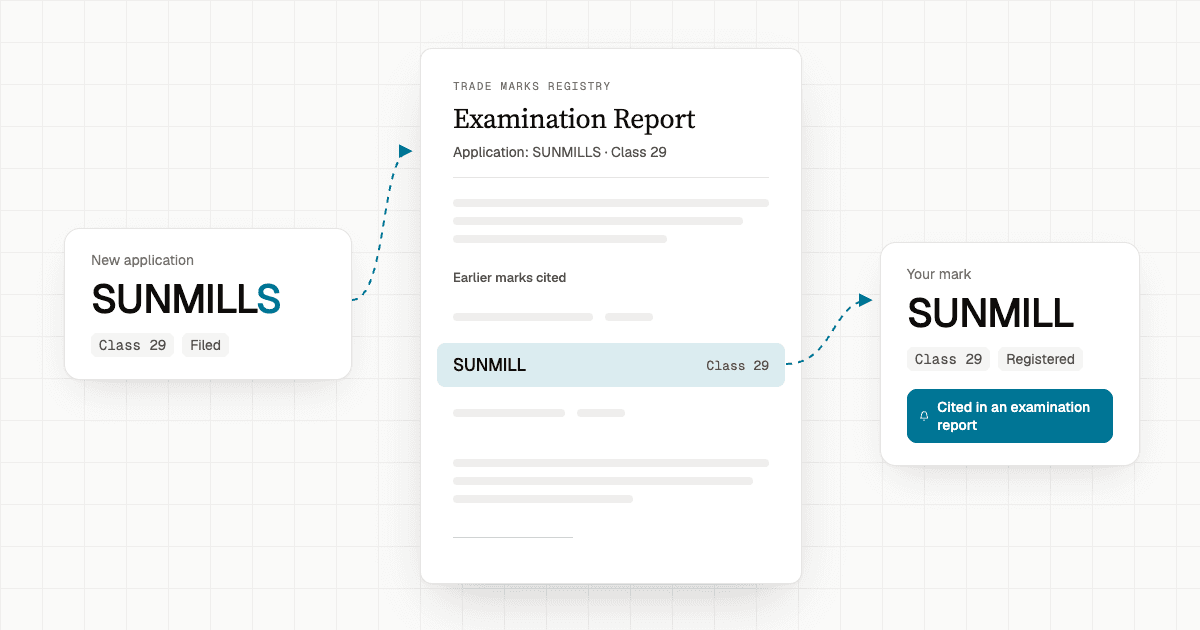
When someone applies for a trademark in India, an examiner at the Registry searches for earlier marks that look, sound or mean the same thing, for similar goods or services. If they find one, they object under Section 11 of the Trade Marks Act and list the earlier mark in the examination report. That listed mark is a cited mark.
So when your mark is cited, the Registry is saying, in writing, that a new application is close enough to yours to confuse people.
The catch is that the report goes to the applicant, not to you. They get a month to reply, and many do. They argue the marks are different, narrow their goods, or ask for a hearing. Some get through and are accepted. You usually hear about it only when the mark is published in the journal, and from that day you have four months to oppose. That period can't be extended.
Why the earlier warning matters
Four months sounds like a lot until you're juggling it with everything else. You need to understand what the other side sells, talk to the client, gather evidence of use, and get sign-off on costs. Plenty of oppositions are filed in the last week.
A citation lets you start that work earlier. You know the application exists while it's still stuck at objection, and you can follow it through the reply and the hearing. If it's accepted, you're ready.
Here's how that plays out.
If you run a business
Say you sell cold-pressed oils as SUNMILL in class 29. A new company applies for SUNMILLS for ghee and butter. The examiner cites your mark.
Without citations, nothing reaches you. Months later, a distributor sends you a photo of a SUNMILLS ghee jar.
With citations, you see the application the week the report is issued. You know who filed it, what they're selling, and that the Registry already sees a conflict. You can call your attorney, send a letter to the applicant, or simply keep an eye on it. Either way, the decision is yours, and you make it early.
If you're an IP attorney or firm
You may handle hundreds of client marks. Nobody can read every examination report the Registry issues to find the ones that mention them.
Citations does that for you. When a client's mark is cited, you can write to them with the report attached: "The Registry has objected to this new application because of your mark. Here's what we suggest." Clients remember the attorney who told them first.
It also makes oppositions easier to plan. You see the applicant's progress, and you know when the clock starts.
How Citations works in MarkSimpl
Go to TM Watch → Citations. Every row pairs one of your portfolio marks with the application whose examination report cites it.
| Column | What you see |
|---|---|
| Your mark | Your mark's name, logo, application number, class, status and owner |
| Cited against | The other application, with the same details, so you can compare the two |
| Cited on | The date of that application's latest examination report |
The newest citations are at the top, so a quick look once a week is enough.
Read the report. Click the Cited on date and the examination report opens. You can see exactly what the examiner wrote and forward it to a client or colleague.
See what can be opposed. When the other application is published, the row shows how many days are left to oppose, for example "92 days to oppose". Turn on Opposable only and you're left with just those rows. Start there.
Use the status. The other application's status tells you how worried to be:
- Objected or Set for Hearing: the objection still stands. Keep watching.
- Accepted or Accepted & Advertised: they got past it. Check the opposition deadline.
- Refused, Abandoned or Withdrawn: the threat has most likely gone.
Search and filter. Search by word mark, owner or application number. The search covers both sides, so a competitor's name and a word from your own brand both work. You can also filter by status and class.
Check a single mark. Open any trademark in MarkSimpl and scroll to the bottom. Cited Marks lists the earlier marks its own examination reports cited. Cited In lists the applications whose reports cite it. This is useful for clearance searches and client reviews.
A 10-minute weekly check
- Open Citations and look at anything new since last week.
- Open the report for each one and compare the marks and the goods.
- If it matters, tell the owner and attach the report.
- Turn on Opposable only and check the deadlines.
- For anything close, decide now: oppose, write to the applicant, or let it go.
Common questions
What does "cited mark" mean in a trademark examination report? It's an earlier trademark the examiner believes is similar to the one being examined. The examiner names it as the reason for a Section 11 objection.
My mark was cited. Will the other application be refused? Not necessarily. The applicant can reply, attend a hearing, and still be accepted. A citation is a warning, not a decision.
When can I oppose it? Once it's accepted and published in the Trade Marks Journal. You then have four months from publication to file a notice of opposition, and the deadline can't be extended.
Do I have to look for citations myself? No. MarkSimpl reads examination reports and matches every citation to the marks in your portfolio.
I only own a few marks. Is this for me? Yes. It takes just one lookalike to cause trouble, and a small portfolio makes it easy to keep track of each citation.
See your citations
If your marks are already in MarkSimpl, your citations are waiting under TM Watch → Citations. Have a look at what's been filed against your brand.
Not using MarkSimpl yet? Talk to us and we'll show you citations for your own marks.